How Does an Uninterruptible Power Supply (UPS) Work? Electrician Explains
Why UPS Systems Matter More Than Ever
Electrician or not, you may have wondered: how does an uninterruptible power supply work when the lights go out? A UPS keeps connected equipment running by switching to battery backup almost instantly, then using an inverter to supply power as clean AC power. The problem is that power outages, brownouts, voltage surge events, and power spikes can damage electronic equipment in homes, offices, retail stores, and data centers across Brooklyn, New York. The cost can be painful: corrupted servers, failed POS terminals, frozen security systems, or healthcare devices losing power at the worst moment. A well-designed ups system solves this by delivering backup power, voltage regulation, and safe shutdown time. Here’s how it works, and how an electrical contractor designs it.
Key Takeaways
- A UPS bridges the gap between utility power and generators by using batteries, dc power, and electronics to deliver clean output ac power during power outages.
- The three main topologies are standby ups, line interactive ups, and online double conversion systems, each suited to different home, office, and data center needs.
- Proper sizing depends on actual power, VA rating, power factor, runtime goals, battery capacity, and future growth.
- Routine testing, battery replacement, and monitoring are essential for reliable backup power and longer battery life.
- Commercial electricians and electrical contractors should design UPS systems to meet NYC and Brooklyn code, electrical service requirements, and data center uptime goals.
What Is an Uninterruptible Power Supply (UPS)?
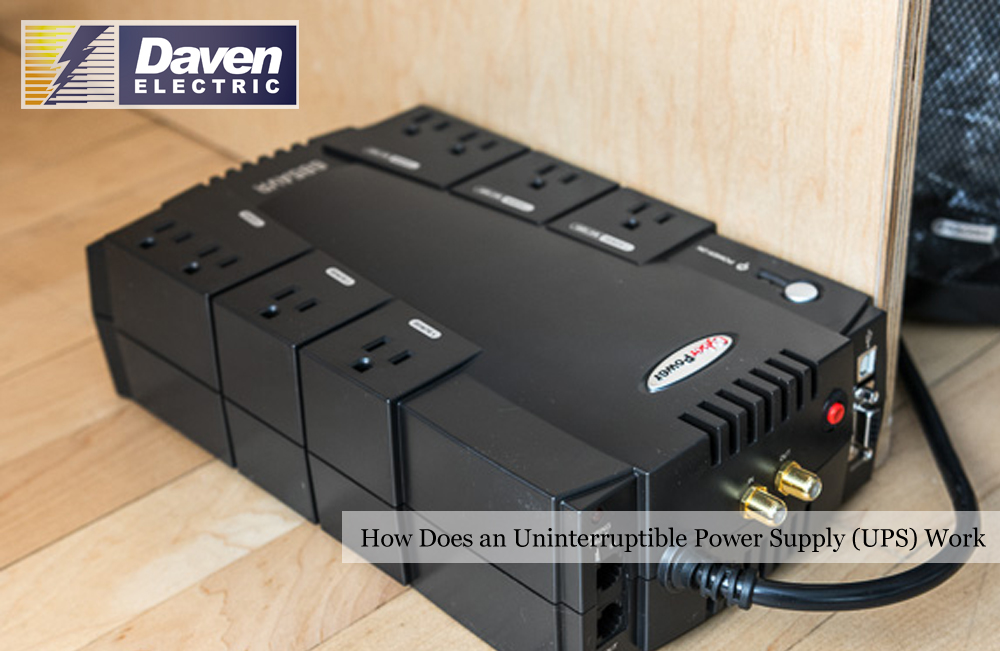
An uninterruptible power supply (UPS) is an electrical device that provides short-term battery power and power conditioning when utility power fails or becomes unstable. In plain terms, a power supply protects connected devices from sudden power failures while giving users time to keep working, save files, or shut down safely.
Unlike a standby generator, a UPS responds in milliseconds. Generators may take several seconds to start, stabilize, and transfer load. A UPS uses stored dc power inside an internal battery or battery bank, then converts that energy into output voltage for sensitive electronic equipment.
A UPS protects against:
- Blackouts and power outages
- Brownouts and voltage drops
- Voltage fluctuations and power fluctuations
- Frequency variations
- Electrical noise and line noise
- Harmonic distortion
- Brief interruptions from the power grid
Typical protected loads include servers, network equipment, data center racks, medical imaging systems, point-of-sale terminals, security systems, and residential electronic devices. In commercial settings, UPS systems are usually planned by a commercial electrician and integrated into the building electrical service, emergency power, and distribution equipment.
Core Components: How a UPS Builds a Clean Power Path
Every uninterruptible power supply system, from a desktop unit to large scale data centers, uses similar electrical building blocks.
The AC input and input breaker connect the UPS to mains power or another input power source. This side handles incoming power, overcurrent protection, grounding, and often surge protection at the service entrance.
The rectifier/charger converts incoming ac power into dc power. It charges batteries and, in online designs, continuously feeds the DC bus.
The battery bank stores energy. Many ups units use valve-regulated lead-acid batteries, while newer systems increasingly use lithium ion batteries. Runtime depends on battery capacity, load size, efficiency, age, and temperature.
The inverter converts stored dc power back into stable ac power for connected equipment. A quality inverter controls frequency, output voltage, waveform shape, and total harmonic distortion so sensitive equipment receives clean electric power.
The static transfer switch, bypass switch, or maintenance bypass moves power flow between inverter output, utility power, and service bypass. These ups switches allow overload handling and maintenance without unnecessarily shutting down critical equipment.
The controller is the UPS brain. It monitors incoming utility power, incoming voltage, line voltage, frequency, and waveform quality many times per cycle. Larger units add Ethernet, SNMP, alarms, and building management system integration.
Step-by-Step: How Does a UPS Work in Real Time?
Here’s the practical sequence from normal operation to restoration.
- Normal mode
When incoming utility power is stable, the UPS either passes power through, regulates it, or continuously converts it, depending on topology. A standby model passes input power to the load. A line-interactive unit can correct minor power fluctuations. An online UPS continuously creates inverter-fed power output.
- Detection
The UPS measures voltage, frequency, waveform quality, and power anomalies. If the input power source fails, or if incoming power moves outside limits, the controller reacts automatically.
- Transfer or continuation
A UPS ensures a continuous power supply by instantly switching to battery power when it detects an outage, voltage drop, or fluctuation, providing enough backup power to keep systems running until electricity is restored or devices are properly shut down. In standby and line-interactive units, the inverter picks up the load after a short transfer. In online systems, the inverter is already feeding the load, so there is no meaningful transfer time.
- Runtime
Runtime depends on capacity, connected load, and efficiency. For example, a 1500 VA UPS with a 0.9 power factor may support about 1350 watts maximum, but a 600-watt load will run longer than a fully loaded system. Small units may provide several minutes; larger systems may support safe shutdown or bridge to a generator.
- Return to utility
When utility power returns within limits, the UPS synchronizes, transfers back if needed, and recharges batteries in stages to protect battery life.
Power Continuity keeps critical equipment running during a blackout, allowing for work to be saved and safe shutdowns.
Major Types of UPS Systems and Where Each One Fits
Modern UPS systems fall into three general categories: online, line-interactive, and standby, each designed for different applications and levels of power protection. Choosing the right design depends on load criticality, budget, utility reliability, and runtime goals.
There is also a less common category: Dynamic uninterruptible power supplies (DUPS) use a flywheel for energy storage and are typically used in large power applications, providing short-term backup during outages.
A commercial electrician may use different UPS types in one building: basic units for workstations, line-interactive systems for telecom closets, and double conversion ups equipment for a server room.
Standby (Offline) UPS: Simple Battery Backup for Basic Loads
Standby UPS systems are the most basic type, providing battery backup and surge protection, and are commonly used for home or small business applications. Under normal conditions, utility power flows directly to connected devices while the UPS keeps batteries charged.
When a power outage or severe sag occurs, an internal relay transfers the load to the inverter, often within 10–25 milliseconds. This is usually acceptable for desktop computers, small routers, monitors, and non-critical office equipment.
The advantages are low cost, compact size, and simple operation. The limitations are smaller battery backup time, limited voltage regulation, and less protection against frequent power fluctuations. In commercial projects, an electrician typically reserves standby UPS units for low-risk endpoints, not core infrastructure or critical medical loads.
Line-Interactive UPS: Smarter Voltage Regulation Without Wasting Battery
A line-interactive UPS uses utility power as the primary source but adds an autotransformer to correct moderate voltage sags and surges. In practical terms, line interactive systems can “boost” low incoming voltage or “buck” high voltage without immediately using battery power.
Line-interactive UPS systems can correct minor power fluctuations without switching to battery power, making them suitable for environments with frequent voltage variations. This helps batteries last longer because they cycle less often.
These systems are common for small server rooms, network closets, POS systems, and edge racks. Many commercial electrician teams favor them for office floors where minor power fluctuations happen but strict 24/7 data center uptime is not required.
Voltage Regulation smooths out minor “sags” and “surges” to deliver consistent, clean power to devices.
Online Double-Conversion UPS: Maximum Power Protection for Critical Loads
An online or double conversion ups always powers the load from its inverter. A UPS continuously draws from a wall outlet (AC power) and uses internal components to perform a continuous conversion cycle.
The core components of a UPS include a rectifier that converts AC power to DC for charging batteries, an inverter that converts stored DC power back to AC for connected devices, and batteries that store energy during outages. In online designs, the rectifier feeds the DC bus, batteries remain connected, and the inverter continuously produces clean output.
Double-conversion UPS systems provide the highest level of power protection by isolating connected equipment from raw power sources, making them ideal for sensitive data and critical equipment. They protect against harmonics, power spikes, voltage drops, frequency swings, and poor generator input.
The tradeoff is higher cost, more heat, and lower efficiency than simpler designs. The efficiency of a UPS is generally measured at full load and nominal line conditions, with a typical efficiency of around 90 percent for many models. Modern UPS systems can achieve efficiency ratings of up to 99 percent, particularly in high-efficiency modes, which significantly reduce energy consumption and operational costs. UPS systems with advanced features like Energy Saver Systems (ESS) can operate at high efficiency without compromising reliability, minimizing energy waste during operation.
Power Quality Issues a UPS Can Solve
Utility power is not always perfect. Breakers protect against overcurrent, but they do not solve every power quality problem.
UPS systems not only provide backup power but also protect against voltage spikes, surges, and fluctuations, which can harm sensitive equipment. They also buffer electrical equipment from brownouts, harmonic distortion, electrical noise, and frequency fluctuations.
Without a UPS, power failures can cause data loss, damaged power supplies, nuisance tripping, and sudden reboots. Power outages can cause major problems for businesses and homes, including equipment damage and data loss, which is why UPS systems are essential for maintaining operations during power failures.
In a data center, even a brief sag can restart servers. In Brooklyn mixed-use buildings, elevators, older feeders, and heavy tenant loads may create voltage dips that line-interactive or online systems can mitigate.
Key Electrical Concepts: VA, Watts, and Power Factor in UPS Selection
UPS selection starts with basic sizing terms. Volt-amperes, or VA, describe apparent power. Watts describe real power, also called actual power, that devices consume.
Power factor is the ratio between watts and VA. For example, a 1000 VA UPS at 0.9 power factor supports about 900 watts. Modern IT equipment often has a power factor near 0.9 or better, but loads still need to be totaled carefully.
A good sizing process is:
- List every electrical device to be protected.
- Add the wattage and startup requirements.
- Convert to VA using expected power factor.
- Add 20–30% capacity for inrush, growth, and battery aging.
- Confirm runtime under realistic power consumption.
Data centers often use redundancy such as N+1 or 2N, meaning extra capacity remains available during maintenance or failure.
How Electricians Size and Design a UPS Installation
A commercial electrician approaches UPS planning as more than buying a box. The process includes load analysis, electrical service review, code compliance, distribution design, and business continuity planning.
The first step is a load inventory: servers, switches, firewalls, telecom equipment, controls, or office printers. Not every device needs uninterruptible power. Critical equipment should be separated from convenience loads.
Runtime is the next decision. Some UPS systems only need to provide emergency power until a generator starts. Others must support a safe shutdown for 10, 20, or 30 minutes.
Distribution design matters. Dedicated circuits, UPS-backed receptacles, panelboards, rack PDUs, grounding, bonding, working clearances, and overcurrent protection must follow the National Electrical Code, New York City amendments, and applicable fire code requirements. The NFPA 70 National Electrical Code is the base reference used with local amendments.
Brooklyn equipment rooms also need ventilation, access, and heat planning, especially where UPS systems and batteries share tight spaces.
UPS Batteries: DC Power, Lifespan, and Maintenance Essentials
Batteries are the heart of a UPS. They store dc power and determine how long the system can support the load during an outage.
Common chemistries include valve-regulated lead-acid, flooded lead-acid, and lithium-ion. VRLA batteries are common and cost-effective, often lasting 3–5 years under normal conditions. Lithium-ion batteries may last 8–10 years or longer, provide higher energy density, and recharge faster, but they cost more upfront.
Battery life depends on ambient temperature, depth of discharge, charge cycles, and charging profile. Heat is a major issue: battery rooms that run too warm can shorten service life dramatically.
For large UPS systems, best practice is periodic testing, capacity checks, and replacement of entire battery strings rather than mixing old and new cells. In Brooklyn commercial buildings, battery installations may require ventilation, spill containment for certain chemistries, fire protection review, and safe disposal under environmental rules.
Monitoring, Testing, and Keeping Your UPS Ready
A UPS is not “set and forget” equipment. It must be tested before the day it is needed.
Most units run automatic self-tests that briefly verify battery health. Larger systems add runtime testing, infrared scans of terminations, bypass checks, alarm testing, and firmware review.
Communication ports such as USB, serial, or Ethernet allow monitoring software to log events, send alerts, and trigger safe server shutdown. In data center environments, UPS data often connects to dashboards that track load, battery status, temperature, and bypass conditions.
A commercial electrician in Brooklyn can help verify grounding and bonding, tighten connections, inspect breakers, and confirm that transfer and bypass procedures are safe. Preventive maintenance is especially important before Northeast storms and utility disruptions.
Using UPS Systems in Data Centers and Commercial Spaces
Data centers, trading floors, healthcare suites, and telecom rooms rely on layered power protection: utility, UPS, and backup generators.
A common data center layout uses online double-conversion UPS modules feeding power distribution units and rack power strips. Larger rooms may use redundant A/B feeds so one side can remain energized while the other is serviced.
Modular ups systems are increasingly popular because they let operators add capacity as IT loads grow. They also support N+1 redundancy without replacing the entire platform.
Generator integration is another major design point. The UPS carries the load instantly when the grid fails. The generator starts, stabilizes, and then becomes the input power source. Poor generator voltage or frequency can cause UPS alarms, so the generator, transfer switch, and UPS must be coordinated by qualified electrical contractors.
In offices and retail spaces, smaller line-interactive units often protect telecom closets, registers, routers, and security equipment.
Putting It All Together: Choosing the Right UPS for Your Building
The right UPS depends on load criticality, runtime, local power reliability, and budget. A standby unit may be enough for a home computer or low-risk workstation. A line-interactive UPS is usually better for small servers, routers, switches, and POS systems. An online double-conversion UPS is the better fit for mission-critical rooms, healthcare systems, and data centers.
Before buying, list essential devices connected to the UPS, estimate total wattage, and decide how long each load must run. Don’t make the mistake of sizing only for today if growth is likely.
In urban buildings, a licensed commercial electrician can confirm that UPS systems integrate safely with panels, transfer switches, generators, grounding, and local electrical rules. As businesses depend more on cloud platforms, digital workflows, and always-on communications, well-designed power protection becomes part of smart electrical service planning.
Commercial Electrician in Brooklyn, NY – Daven Electric Corp.
At Daven Electric Corp., we help Brooklyn businesses protect uptime with safe, code-conscious UPS design, installation, and maintenance. Our commercial electrician team works with offices, retail spaces, equipment rooms, and data center environments that cannot afford unexpected downtime. We handle projects ranging from a single line-interactive UPS for network equipment to larger online double-conversion UPS systems integrated with generators, panels, and building management systems. If you need dependable electrical service, upgraded power protection, or a safer power supply plan in Brooklyn, New York, call us at (212) 390-1106 or fill out our contact form. We prioritize safety, uptime, clean installation practices, and local code compliance on every UPS project we complete.
Frequently Asked Questions
Can I plug a power strip or surge protector into a UPS?
Many UPS manufacturers discourage plugging a power strip or separate surge protector into UPS battery-backed outlets. The issue is not just convenience; daisy-chaining can overload the UPS, confuse load sensing, or interfere with surge clamping. Critical devices should usually plug directly into the UPS outlets. If the unit has “surge only” outlets, reserve those for low-risk accessories that do not need battery runtime. In a commercial space, an electrician can install additional dedicated UPS-backed receptacles instead of relying on long cords and chained strips. Always check the UPS manual and applicable electrical code before adding multi-outlet devices.
Is it safe to connect a UPS to a portable generator?
Not every UPS works well with a small portable generator. Some generators produce unstable voltage, frequency drift, or high waveform distortion, which can make the UPS constantly switch to battery or report a fault. For sensitive electronics, use a generator designed for clean output, properly sized for the UPS and connected load. Inverter generators may perform better for small applications, while permanent systems should use approved transfer equipment. In New York, permanent generator connections must follow electrical code, utility rules, grounding requirements, and permitting where applicable. A qualified electrical contractor should review the setup before connecting critical loads.
How often should UPS batteries be replaced in a commercial environment?
Many VRLA batteries used in UPS systems are rated for about 3–5 years, but real-world life may be shorter in hot rooms, high-cycle environments, or poorly ventilated equipment spaces. Data centers and critical facilities often schedule replacement before the expected end of life because a weak battery string can reduce runtime without obvious warning. Periodic capacity testing, impedance checks, and UPS diagnostics help refine the replacement schedule. In Brooklyn commercial buildings, battery replacement should be performed safely by trained personnel or a licensed electrician, with proper handling, recycling, and disposal under environmental and fire safety requirements.
What’s the difference between surge protectors and UPS systems?
A surge protector helps clamp short voltage spikes caused by lightning, utility switching, or internal building events. It does not keep equipment running when power fails. A UPS combines surge protection with battery backup and, depending on the type, voltage regulation or full double-conversion conditioning. That means a UPS can protect against sudden shutdowns, data corruption, brownouts, and short interruptions that a basic strip cannot handle. For mission-critical loads, the best protection starts with properly grounded building wiring, panel-level surge protection where appropriate, and a correctly sized UPS installed or reviewed by an electrician familiar with the application.
Do I need a UPS if my building already has an emergency generator?
Yes, many buildings still need a UPS even with an emergency generator. A generator takes time to start, stabilize voltage and frequency, and transfer load. During that gap, computers, servers, controls, and network equipment may shut off unless a UPS carries them. The typical sequence is simple: utility power fails, the UPS instantly supports the load, the generator starts and stabilizes, and the system transfers to generator-backed power. The UPS may remain online to condition generator output. In Brooklyn high-rise and commercial buildings, electrical contractors usually design generators and UPS systems together as one resilience plan.
Disclaimer: This article provides general educational information about UPS and electrical systems and is not a substitute for site-specific advice from a licensed electrician or professional engineer.
Read What to Expect: A Brooklyn Electrician Explains the Residential Inspection Checklist